---
title: "Signal and AI Assistants: What It Says It Blocks, and What It Doesn’t"
url: "https://blog.sf-paris.dev/en/signal-ai-assistants-screen-security-ios-android/"
lang: "en"
translations:
it: "https://blog.sf-paris.dev/signal-assistenti-ai-screen-security-ios-android/"
author: "Simone Flavio Paris"
published: "2026-11-27T08:00:00+00:00"
updated: "2026-11-27T06:13:08+00:00"
categories:
- "News"
tags:
- "Android"
- "artificial intelligence"
- "iOS"
- "privacy"
- "Signal"
summary: "Signal says it blocks screenshots on iOS 27 and turns on Screen security on Android when it detects an AI assistant; not on macOS or every Android phone."
reading_time_minutes: 10
word_count: 2168
---
# Signal and AI Assistants: What It Says It Blocks, and What It Doesn’t
An AI assistant on a phone, like Siri AI on iOS 27 or Gemini on Android, can answer questions by “reading” the screen. If the screen shows a Signal conversation, according to Signal the text of the messages ends up in a local database or on a remote server used by the assistant: outside the app’s control, and with the data of every participant.
On November 20, Meredith Whittaker, Signal’s president, wrote on the official blog that the app restricts the ability of operating-system AI assistants to capture and store its data. On the 23rd, Help Net Security, a cybersecurity site, headlined the story “Signal blocks AI assistants from peeking at your private messages.” According to Signal, what the app blocks is screen capture, not the assistant. The block applies on iOS 27 and on the Android versions where the app detects an assistant; on macOS there is none.
In brief
According to Signal, on iOS 27 the app prevents screenshots inside it, and on Android it automatically turns on the “Screen security” setting when it detects an AI assistant trying to read the screen. Signal says the protection is incomplete: on macOS it cannot apply it, it does not cover all Android phones, an agent can still read the data from the filesystem, and the user can turn it off. According to the EFF, a digital rights organization, the feature is on by default after the app update; Signal and Help Net Security do not say so. The only test reported is Help Net Security’s, a screenshot taken by hand that came out blank, with no system stated; no source gives the app version from which it applies.
## What Did Signal Write?
According to Signal, the AI features inside phone operating systems, such as Google’s “Gemini Intelligence” and Apple’s “Onscreen Awareness” with Siri AI, “scan” what is on the screen to answer the user’s questions. That way Signal’s data is captured and made available to the systems acting as assistants. For over a decade, the privacy guarantee has rested on open-source code and a formally verified encryption protocol. Now, with these assistants, Signal can no longer guarantee privacy on its own once the data has been captured: “an existential threat.”
Signal recalls a precedent. Last year, on Windows 11, it used screenshot blocking against Microsoft’s Recall, the feature that captures the screen every few seconds and extracts the text into a searchable archive. Recall could thus expose and keep the app’s data indefinitely, including disappearing messages. Now Signal is taking “similar measures” on iOS 27 and on the Android versions where it can detect an AI assistant attempting to read the screen.
## What Does Signal Do on iPhone and on Android?
On iOS 27, according to Signal, the app prevents screenshots inside it. According to Help Net Security, a new setting, “Block Siri AI,” controls the feature.
On Android, Signal detects when an AI assistant tries to read the screen and automatically turns on the “Screen security” setting. Signal explains the choice this way: for many phone makers it has no reliable way to notice screenshots if they are already disabled. Disabling them for everyone would have confused users, because screenshots would simply stop working; Signal preferred to detect the assistant.
In the Help Net Security article, the writer says they tried taking a screenshot inside the app: the image showed the Signal logo centered on a white background, with no message. The article does not say on which system or with which assistant active: the test shows that a screenshot taken by hand comes out blank, not that an assistant cannot read the screen.
The EFF, on November 24, adds two details. The protection is on by default, so updating the app is enough; Signal and Help Net Security do not say whether it is, but they write that it can be turned off in the settings. Google does not currently offer a similar option for excluding an app: on Android, Signal does what it can, turning off screenshots when it detects an assistant. The EFF discloses Apple among its donors, without this influencing its positions.
Signal also says it cannot cover all Android phones: the protection applies on “Android versions where we can detect” an assistant. Help Net Security writes “supported Android devices, including Google’s Gemini” and does not say which. Signal does not indicate which Android models or versions are covered, or the app version from which the feature applies.
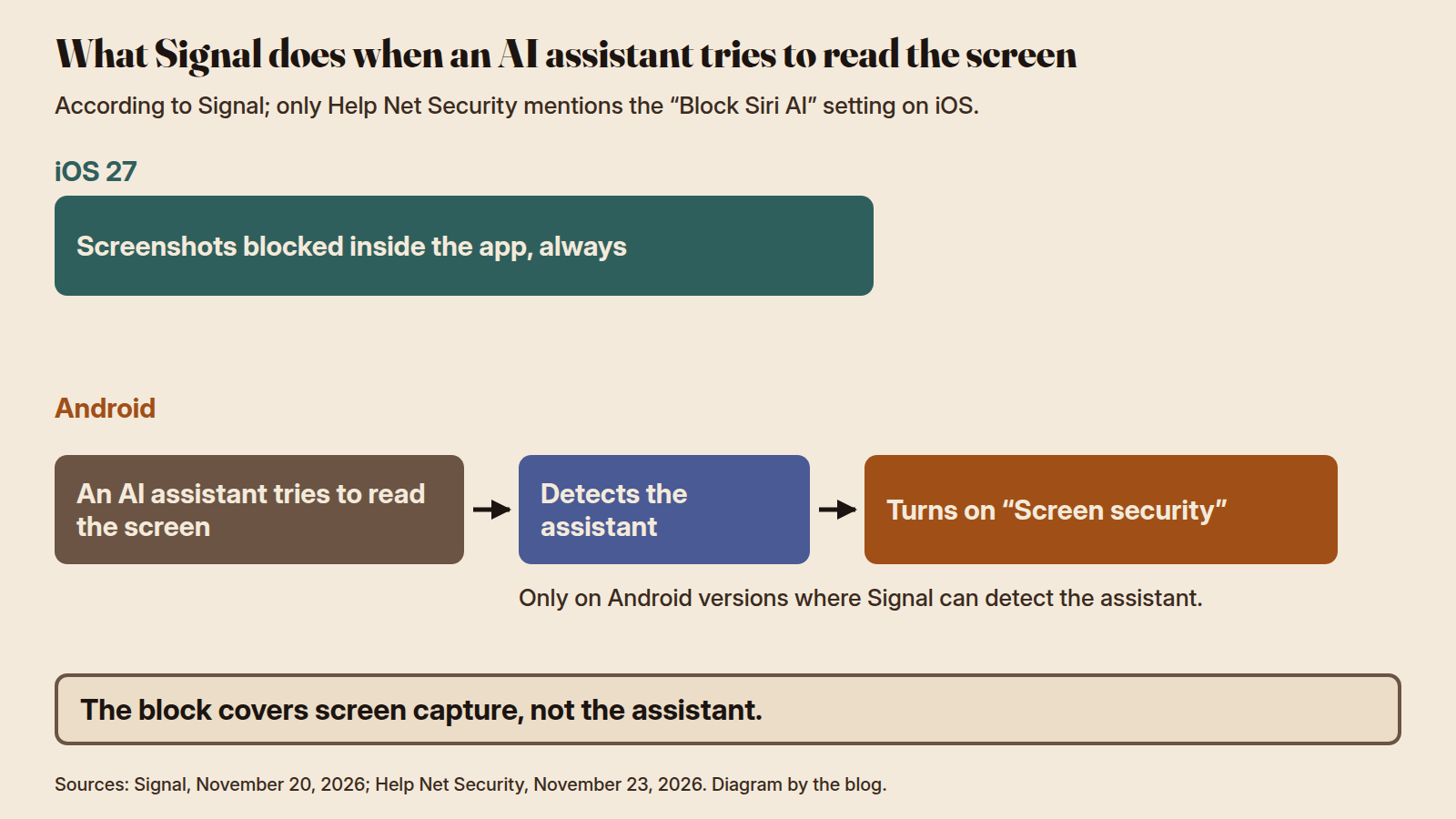
What Signal does when an AI assistant tries to read the screen. Sources: Signal, November 20, 2026; Help Net Security, November 23, 2026.
## What Does Signal Not Block?
Signal itself says the remedy is incomplete and names three limits; the user’s choice comes on top of these. The first limit: blocking screenshots does not cover other “more sneaky” ways an AI agent can reach an app’s data. For example, it can read from the filesystem, that is, the phone’s storage, the content already there.
The second limit concerns macOS, the Mac operating system. Signal says it cannot stop Siri AI: Apple does not provide the documented tools that would be needed to reliably block screenshots. Protections against continuous screen capture exist, but they do not apply to screenshots, which are how most agents read the data of applications. Signal’s only advice for macOS 27 users is to add the app to the “Excluded Apps” list in System Settings > Siri.
The third limit concerns Android: Signal writes that it cannot cover all phones, because the protection depends on detecting the assistant. The user’s choice remains. Anyone who wants to take screenshots can turn off the protection in the app’s settings. Signal warns that this may expose the content of the user and of their contacts to AI assistants and that the privacy guarantees no longer hold.
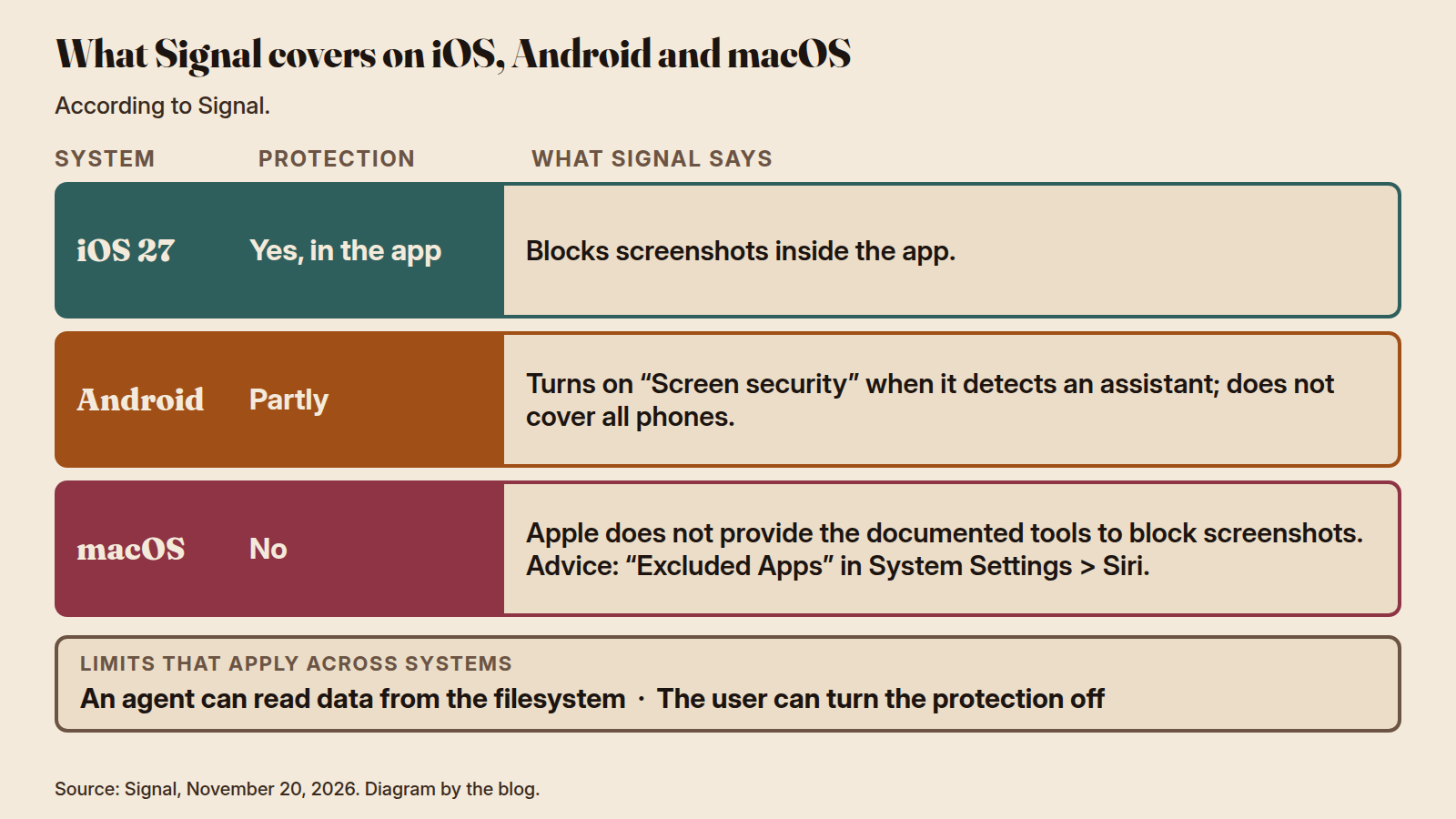
What Signal covers on iOS, Android and macOS. Source: Signal, November 20, 2026.
## What Can Users Control on Their Own Phones?
The EFF describes two controls in its October 28 article, which predates Signal’s change.
On iPhone, since the iOS 27.2 update, there is a setting to exclude apps from Siri AI. According to the EFF you go to Settings > Siri > Excluded Apps, tap “Add Apps” and choose the app. From then on Siri AI cannot read its contents, and some features stop working. Someone who excludes Signal and then asks the assistant about what is in the app cannot get that information from it. By default, the EFF writes in its November 24 article, every app is available to Siri AI: it is up to the user to put the barrier up.
On Android, the EFF writes that the control is less direct and that there is no per-app choice for “screen context.” In the Gemini app you go to Settings > Personal Intelligence > Connected Apps and revoke access to the apps the assistant should not see. Signal does not appear in the list because it does not support Gemini’s app access, so the assistant cannot read its contents directly. Two features remain, however, and according to the EFF they can reach the content of Signal or its notifications, if the user uses them:
- **Notifications:** Gemini can read them if the “Device Assistance” connected app is on.
- **Screen context:** Gemini can use it unless the “Use screen and app data” option is turned off in Device controls > Screen context.
## What Do the Sources Not Say Yet?
The EFF, which runs a campaign for encryption, describes the feature as “a useful new barrier” and is the only one to give the information on Apple’s and Google’s controls and on the default setting. Signal does not say whether the feature is already on in Italy.
Missing are the Signal version from which the feature applies, the list of Android assistants that Signal manages to detect besides Gemini, and evidence of effectiveness other than Help Net’s test. Signal asks the platforms for an exclusion that covers notifications, but does not say whether its protection covers them: the EFF writes that Gemini can read them with “Device Assistance” on (October 28 article, before the app update). Signal also says it does not know how these assistants really work: it spent months investigating Android and iOS to understand what happens to apps’ data, because public documentation is lacking.
## What Does Signal Ask of Apple, Google and Microsoft?
Signal also sees a problem in AI assistants from other companies, such as Meta’s Muse. According to Signal, these agents exploit the deep permissions that users are encouraged to grant during setup. They often use accessibility settings, which were meant to help people use apps and not to act as a skeleton key for AI agents. Signal says tools are needed to stop these agents, too, from accessing app data.
Signal asks for two things. The first: an easy, documented way for apps to opt out of AI access, including screen reading, files and notifications, without losing their features. The second: better technical documentation on how assistants handle data. Signal adds that confidential computing, that is, processing data in an isolated environment, is not a complete solution and does not address the core concerns. Confidential computing leaves to the providers the power to decide how far the privacy guarantees go, if any. Signal says it is “cautiously optimistic” that some major system makers, such as Google and Apple, are talking with it.
Whittaker compares the three operating systems to the oceans in which Signal and other apps must swim. Signal calls itself “the canary in the coal mine”: the issue, it says, affects the entire app ecosystem.
## Frequently Asked Questions
Does Signal Block AI Assistants on the Phone?
According to Signal, it blocks screen capture by assistants: on iOS 27 it prevents screenshots in the app, on Android it turns on “Screen security” when it detects an assistant. Signal says the protection is incomplete: it does not cover macOS or all Android phones, and it does not stop an agent that reads data from the filesystem.
What Does Signal Do on Android?
According to Signal, when it detects that an AI assistant is trying to read the screen, it automatically turns on the “Screen security” setting, on the Android versions where it can detect it. Signal says it cannot cover all Android phones. Help Net Security writes “supported Android devices, including Google’s Gemini” and does not say which; no source gives the app version.
How Do You Exclude an App from Siri AI, According to the EFF?
According to the EFF, since iOS 27.2 you go to Settings > Siri > Excluded Apps, tap “Add Apps” and choose the app: Siri AI can no longer read its contents. The EFF warns that some features stop working and, in its November 24 article, that by default every app is available to Siri AI.
Does Signal’s Protection Work on a Mac?
No, according to Signal: on macOS it cannot reliably block screenshots, because Apple does not provide the documented tools that would be needed. For macOS 27 users, Signal recommends adding the app to the “Excluded Apps” list in System Settings > Siri, to protect message content from Siri AI’s access, even unprompted.
Is Signal’s Protection On by Default?
According to the EFF, the protection is on by default and updating the app is enough; Signal and Help Net Security do not say whether it is. According to Signal and Help Net Security, anyone who wants to take screenshots can turn it off in the settings, at the risk of exposing the content to AI assistants.
What Does Signal Ask of Apple, Google and Microsoft?
According to Signal, two things: an easy, documented way for apps to opt out of AI access, including screen reading, files and notifications, without losing their features, and better technical documentation on how assistants handle data. Signal says it is “cautiously optimistic” about its discussions with Google and Apple.
## Read Also
- [iCloud: From iOS 27.3, Apple Will Check Public Links — What Changes for Photos and Files](https://blog.sf-paris.dev/en/icloud-public-links-ios-27-3-apple/): another Apple change, from iOS 27.3, to what happens to the files users keep on iCloud.
- [Google Announces Android Developer Verification Beyond Google Play: What F-Droid and GrapheneOS Say](https://blog.sf-paris.dev/en/android-developer-verification-2027-advanced-flow/): another rule from an operating-system maker about what apps can do on Android, and what open-source projects say about it.
## Sources
Documents from the parties themselves, accessed November 25, 2026. Type of source: primary (the party making the statement), secondary (the party reporting it).
- Signal, Meredith Whittaker, “Signal is Serious About Protecting Your Privacy,” November 20, 2026. Primary (Signal, an interested party). https://signal.org/blog/protecting-your-privacy/
- Help Net Security, Anamarija Pogorelec, “Signal blocks AI assistants from peeking at your private messages,” November 23, 2026. Secondary. https://www.helpnetsecurity.com/2026/11/23/signal-blocks-ai-assistants-screenshots/
- EFF, Thorin Klosowski, “Signal Moves to Block AI Agents,” November 24, 2026. Secondary (digital rights organization). https://www.eff.org/deeplinks/2026/11/signal-now-blocks-ai-agents
- EFF, Thorin Klosowski, “Victory! You Can Now Exclude Apps from Siri AI,” October 28, 2026. Secondary. https://www.eff.org/deeplinks/2026/10/victory-you-can-now-exclude-apps-siri-ai
The quotations from Signal, Help Net Security and the EFF are in the original English.